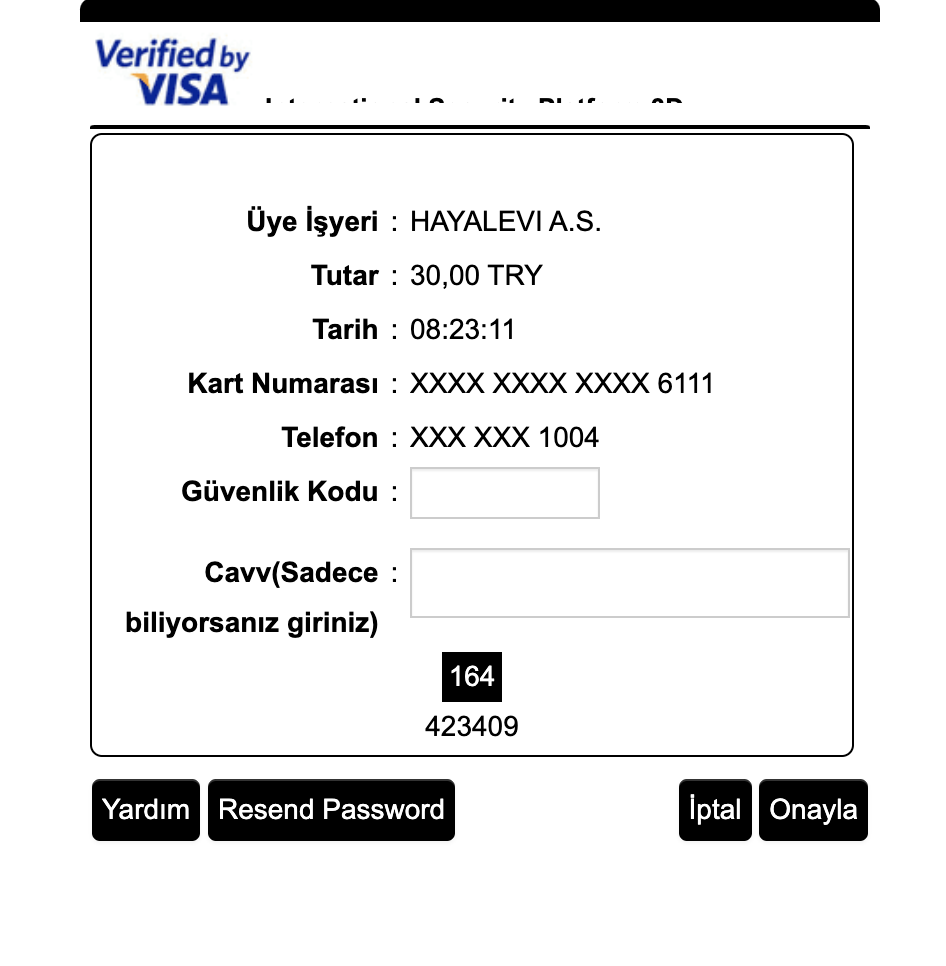

API Dokümanı - Taksit Bilgisi Size Ait
2 Çeşit Paynkolay API’si bulunmaktadır. Bu API’ler ile kendi ödeme form yapınızı oluşturabilirsiniz.
Section titled “2 Çeşit Paynkolay API’si bulunmaktadır. Bu API’ler ile kendi ödeme form yapınızı oluşturabilirsiniz.”API’ler ile üye işyeri kendi ödeme formunu kullanır.
Postman collection’ını indirmek için tıklayınız. Örnek kodları Postman Code sinppet’inde görebilirsiniz.
Minimum TLS 1.2 kullanılmalıdır. TLS Bağlantı Sorunlarını Çözme Kılavuzu için tıklayınız.
1 - Paynkolay API ( Taksitleri kendi taksit tablolarınızdan getirmek isterseniz kullanacağınız versiyon )
- Bu versiyonda tüm değişkenler “https://paynkolaytest.nkolayislem.com.tr/Vpos/v1/Payment” adresine Body’de form-data olarak POST edilir. ( sx, clientRefCode, successUrl, failUrl, amount, installmentNo, cardHolderName, month, year, cvv, cardNumber, use3D, transactionType, rnd, hashData, environment, currencyNumber )
- Canlı ortam linki: https://paynkolay.nkolayislem.com.tr/Vpos/v1/Payment
- Canlı ortama sunucunuzdan istek göndermeniz gerekir. Localhost’tan gönderilen istekler güvenlik hatası verir.
- Hash hesaplaması için tıklayınız.
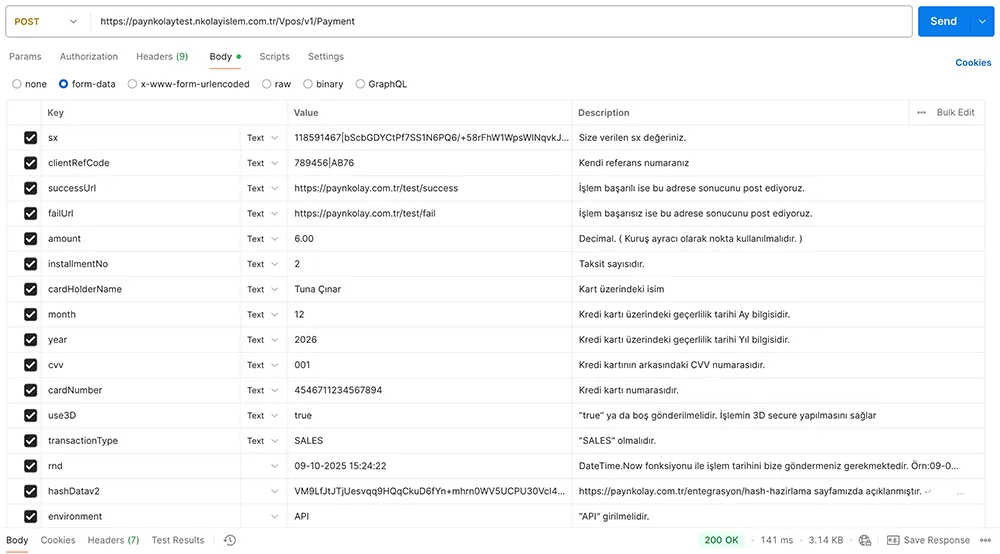
- Payment Servis test ortam linki: “https://paynkolaytest.nkolayislem.com.tr/Vpos/v1/Payment” İlgili tüm değişkenleri Postman collection’ından görebilirsiniz.
- İşlem, 3D değilse ödeme alınır ve successURL sayfanıza response parametreleri dönülür. Response Dönüş Parametreleri
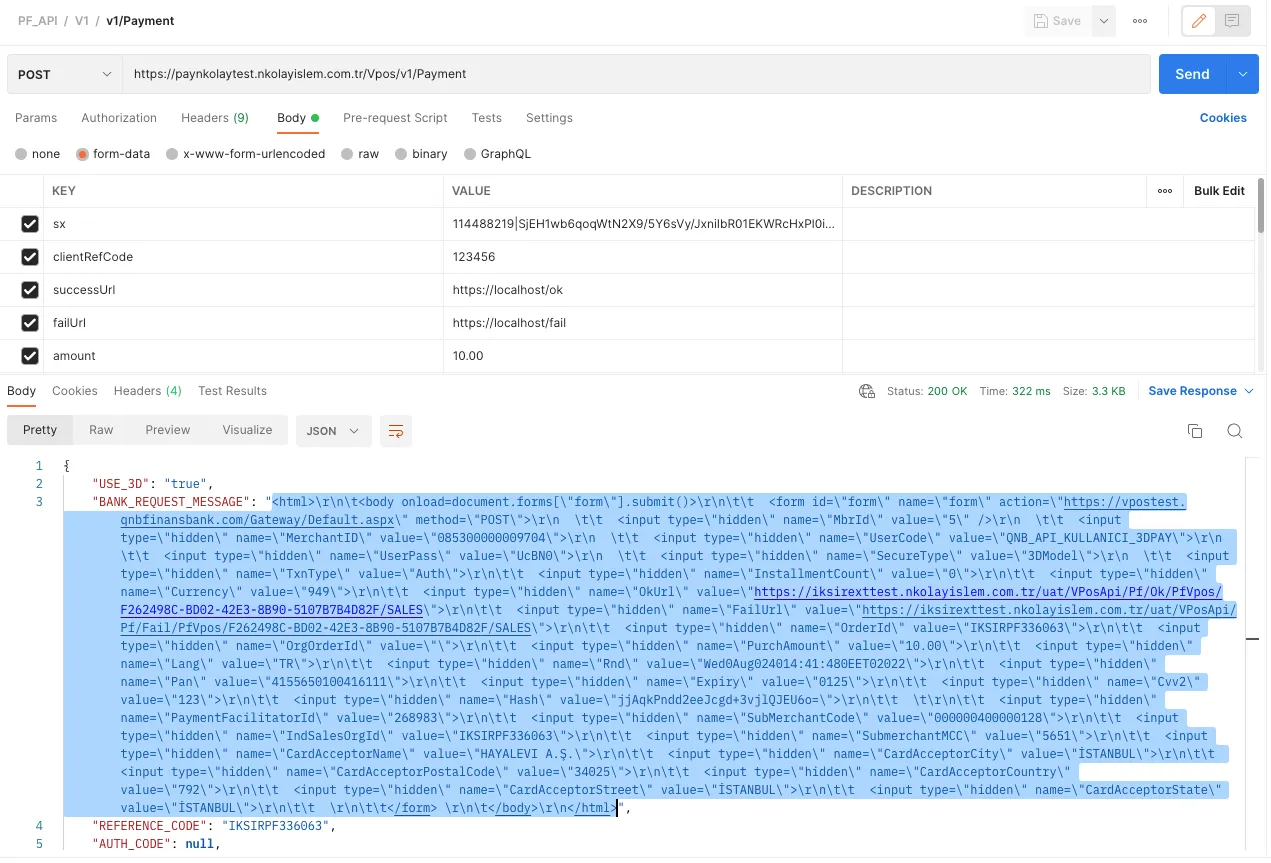
- use3D “true” ise 3D formu gelecektir. Bu formu şu şekilde ekranda çalıştırabilirsiniz.
<?php
// 1. Secure your keys (These should ideally be in constants or config)$merchantSecretKey = "_YckdxUbv4vrnMUZ6VQsr";$sx = "118591467|bScbGDYCtPf7SS1N6PQ6/+58rFhW1WpsWINqvkJFaJlu6bMH2tgPKDQtjeA5vClpzJP24uA0vx7OX53cP3SgUspa4EvYix+1C3aXe++8glUvu9Oyyj3v300p5NP7ro/9K57Zcw==";
// 2. Prepare variables$clientRefCode = "APP000000000017|82343"; // Unique reference$amount = "10.00";$successUrl = "https://paynkolay.com.tr/biz/success";$failUrl = "https://paynkolay.com.tr/biz/fail";$rnd = date("d-m-Y H:i:s");$customerKey = "";$merchantCustomerNo = "CUST0001";
// 3. Generate Hash$hashstr = $sx . "|" . $clientRefCode . "|" . $amount . "|" . $successUrl . "|" . $failUrl . "|" . $rnd . "|" . $customerKey . "|" . $merchantSecretKey;$hash = mb_convert_encoding($hashstr, 'UTF-8');$hashedBytes = hash("sha512", $hash, true);$hashDataV2 = base64_encode($hashedBytes);
/***  IP detection*/function getClientIpAddress(): string {    $headers = ['HTTP_CLIENT_IP', 'HTTP_X_FORWARDED_FOR', 'REMOTE_ADDR'];    foreach ($headers as $header) {        if (!empty($_SERVER[$header])) {            $ipList = explode(',', $_SERVER[$header]);            $ip = trim($ipList[0]);            if (filter_var($ip, FILTER_VALIDATE_IP)) return $ip;        }    }    return '127.0.0.1';}
$cardHolderIP = getClientIpAddress();
// 4. API Request$postData = [    'sx' => $sx,    'clientRefCode' => $clientRefCode,    'successUrl' => $successUrl,    'failUrl' => $failUrl,    'amount' => $amount,    'installmentNo' => '1',    'cardHolderName' => 'Tuna Cinar',    'month' => '12',    'year' => '2026',    'cvv' => '001',    'cardNumber' => '4546711234567894',    'use3D' => 'true',    'transactionType' => 'SALES',    'cardHolderIP' => $cardHolderIP,    'hashDatav2' => $hashDataV2,    'rnd' => $rnd,    'environment' => 'API',    'currencyNumber' => '949',    'MerchantCustomerNo' => $merchantCustomerNo];
$curl = curl_init();curl_setopt_array($curl, [    CURLOPT_URL => 'https://paynkolaytest.nkolayislem.com.tr/Vpos/v1/Payment',    CURLOPT_RETURNTRANSFER => true,    CURLOPT_POST => true,    CURLOPT_POSTFIELDS => http_build_query($postData), // Cleaner than passing raw array    CURLOPT_TIMEOUT => 30,]);
$response = curl_exec($curl);$err = curl_error($curl);curl_close($curl);
if ($err) {    echo "cURL Error #:" . htmlspecialchars($err);} else {    $data = json_decode($response, true);
    // 5.  BANK_REQUEST_MESSAGE Output    echo $bankMessage = $data['BANK_REQUEST_MESSAGE'] ?? 'No message returned';
}using Microsoft.AspNetCore.Builder;using Microsoft.AspNetCore.Http;using Microsoft.Extensions.DependencyInjection;using System.Net.Http;using System.Security.Cryptography;using System.Text;using System.Text.Json;using System.Net;using System.Linq;
var builder = WebApplication.CreateBuilder(args);var app = builder.Build();
app.MapGet("/", async (HttpContext context) =>{ try { // 1. CONFIGURATION string customerKey = ""; string merchantSecretKey = "_YckdxUbv4vrnMUZ6VQsr";
string sx = "118591467|bScbGDYCtPf7SS1N6PQ6/+58rFhW1WpsWINqvkJFaJlu6bMH2tgPKDQtjeA5vClpzJP24uA0vx7OX53cP3SgUspa4EvYix+1C3aXe++8glUvu9Oyyj3v300p5NP7ro/9K57Zcw=="; string clientRefCode = "789456|AB76"; string amount = "6.00"; string successUrl = "https://paynkolay.com.tr/test/success"; string failUrl = "https://paynkolay.com.tr/test/fail";
// UPDATE: Ensure we use Turkey Time (UTC+3) regardless of Docker's clock // If DateTime.Now (UTC) works, you can keep your old line. // But this is safer for Turkish banks: string rnd = DateTime.UtcNow.AddHours(3).ToString("dd-MM-yyyy HH:mm:ss");
string merchantCustomerNo = "MS-34345";
// 2. GET DYNAMIC IP string detectedIp = GetClientIpAddress(context);
// 3. CALCULATE HASH string rawData = $"{sx}|{clientRefCode}|{amount}|{successUrl}|{failUrl}|{rnd}|{customerKey}|{merchantSecretKey}";
string hashDatav2 = ""; using (var sha512 = SHA512.Create()) { byte[] bytes = sha512.ComputeHash(Encoding.UTF8.GetBytes(rawData)); hashDatav2 = Convert.ToBase64String(bytes); }
// 4. PREPARE REQUEST using var client = new HttpClient(); using var request = new HttpRequestMessage(HttpMethod.Post, "https://paynkolaytest.nkolayislem.com.tr/Vpos/v1/Payment");
var content = new MultipartFormDataContent(); content.Add(new StringContent(sx), "sx"); content.Add(new StringContent(clientRefCode), "clientRefCode"); content.Add(new StringContent(successUrl), "successUrl"); content.Add(new StringContent(failUrl), "failUrl"); content.Add(new StringContent(amount), "amount"); content.Add(new StringContent(rnd), "rnd"); content.Add(new StringContent(hashDatav2), "hashDatav2"); content.Add(new StringContent(merchantCustomerNo), "MerchantCustomerNo");
// We add the IP here only once content.Add(new StringContent(detectedIp), "cardHolderIP");
content.Add(new StringContent("2"), "installmentNo"); content.Add(new StringContent("Tuna Çınar"), "cardHolderName"); content.Add(new StringContent("12"), "month"); content.Add(new StringContent("2026"), "year"); content.Add(new StringContent("001"), "cvv"); content.Add(new StringContent("4546711234567894"), "cardNumber"); content.Add(new StringContent("true"), "use3D"); content.Add(new StringContent("SALES"), "transactionType"); content.Add(new StringContent("API"), "environment"); content.Add(new StringContent("949"), "currencyNumber");
request.Content = content;
// 5. SEND REQUEST var response = await client.SendAsync(request); string jsonString = await response.Content.ReadAsStringAsync();
// 6. EXTRACT AND CLEAN HTML using (JsonDocument doc = JsonDocument.Parse(jsonString)) { if (doc.RootElement.TryGetProperty("BANK_REQUEST_MESSAGE", out JsonElement htmlElement)) { string rawHtml = htmlElement.GetString() ?? ""; string cleanHtml = CleanHtml(rawHtml); return Results.Content(cleanHtml, "text/html"); } else { return Results.Content(jsonString, "application/json"); } } } catch (Exception ex) { return Results.Problem($"Error: {ex.Message}"); }});
app.Run();
// --- HELPER FUNCTIONS ---string CleanHtml(string input){ if (string.IsNullOrEmpty(input)) return input; return input .Replace("\\r", "") .Replace("\\n", "") .Replace("\r", "") .Replace("\n", "") .Replace("\\\"", "\"") .Trim();}
string GetClientIpAddress(HttpContext context){ var headers = new[] { "Client-IP", "X-Forwarded-For", "X-Forwarded", "X-Cluster-Client-IP", "Forwarded-For", "Forwarded" }; foreach (var header in headers) { var ipHeaderValue = context.Request.Headers[header].FirstOrDefault(); if (!string.IsNullOrEmpty(ipHeaderValue)) { var ipList = ipHeaderValue.Split(',').Select(ip => ip.Trim()); var firstIp = ipList.FirstOrDefault(); if (firstIp != null && IPAddress.TryParse(firstIp, out _)) return firstIp; } } var remoteIp = context.Connection.RemoteIpAddress; return remoteIp != null ? remoteIp.MapToIPv4().ToString() : "UNKNOWN";}import http.clientfrom codecs import encode
conn = http.client.HTTPSConnection("paynkolaytest.nkolayislem.com.tr")dataList = []boundary = 'wL36Yn8afVp8Ag7AmP8qZ0SA4n1v9T'dataList.append(encode('--' + boundary))dataList.append(encode('Content-Disposition: form-data; name=sx;'))
dataList.append(encode('Content-Type: {}'.format('text/plain')))dataList.append(encode(''))
dataList.append(encode("118591467|bScbGDYCtPf7SS1N6PQ6/+58rFhW1WpsWINqvkJFaJlu6bMH2tgPKDQtjeA5vClpzJP24uA0vx7OX53cP3SgUspa4EvYix+1C3aXe++8glUvu9Oyyj3v300p5NP7ro/9K57Zcw=="))dataList.append(encode('--' + boundary))dataList.append(encode('Content-Disposition: form-data; name=clientRefCode;'))
dataList.append(encode('Content-Type: {}'.format('text/plain')))dataList.append(encode(''))
dataList.append(encode("789456|AB76"))dataList.append(encode('--' + boundary))dataList.append(encode('Content-Disposition: form-data; name=successUrl;'))
dataList.append(encode('Content-Type: {}'.format('text/plain')))dataList.append(encode(''))
dataList.append(encode("https://paynkolay.com.tr/test/success"))dataList.append(encode('--' + boundary))dataList.append(encode('Content-Disposition: form-data; name=failUrl;'))
dataList.append(encode('Content-Type: {}'.format('text/plain')))dataList.append(encode(''))
dataList.append(encode("https://paynkolay.com.tr/test/fail"))dataList.append(encode('--' + boundary))dataList.append(encode('Content-Disposition: form-data; name=amount;'))
dataList.append(encode('Content-Type: {}'.format('text/plain')))dataList.append(encode(''))
dataList.append(encode("6.00"))dataList.append(encode('--' + boundary))dataList.append(encode('Content-Disposition: form-data; name=installmentNo;'))
dataList.append(encode('Content-Type: {}'.format('text/plain')))dataList.append(encode(''))
dataList.append(encode("2"))dataList.append(encode('--' + boundary))dataList.append(encode('Content-Disposition: form-data; name=cardHolderName;'))
dataList.append(encode('Content-Type: {}'.format('text/plain')))dataList.append(encode(''))
dataList.append(encode("Tuna Çınar"))dataList.append(encode('--' + boundary))dataList.append(encode('Content-Disposition: form-data; name=month;'))
dataList.append(encode('Content-Type: {}'.format('text/plain')))dataList.append(encode(''))
dataList.append(encode("12"))dataList.append(encode('--' + boundary))dataList.append(encode('Content-Disposition: form-data; name=year;'))
dataList.append(encode('Content-Type: {}'.format('text/plain')))dataList.append(encode(''))
dataList.append(encode("2026"))dataList.append(encode('--' + boundary))dataList.append(encode('Content-Disposition: form-data; name=cvv;'))
dataList.append(encode('Content-Type: {}'.format('text/plain')))dataList.append(encode(''))
dataList.append(encode("001"))dataList.append(encode('--' + boundary))dataList.append(encode('Content-Disposition: form-data; name=cardNumber;'))
dataList.append(encode('Content-Type: {}'.format('text/plain')))dataList.append(encode(''))
dataList.append(encode("4546711234567894"))dataList.append(encode('--' + boundary))dataList.append(encode('Content-Disposition: form-data; name=use3D;'))
dataList.append(encode('Content-Type: {}'.format('text/plain')))dataList.append(encode(''))
dataList.append(encode("true"))dataList.append(encode('--' + boundary))dataList.append(encode('Content-Disposition: form-data; name=transactionType;'))
dataList.append(encode('Content-Type: {}'.format('text/plain')))dataList.append(encode(''))
dataList.append(encode("SALES"))dataList.append(encode('--' + boundary))dataList.append(encode('Content-Disposition: form-data; name=cardHolderIP;'))
dataList.append(encode('Content-Type: {}'.format('text/plain')))dataList.append(encode(''))
dataList.append(encode("185.125.190.58"))dataList.append(encode('--' + boundary))dataList.append(encode('Content-Disposition: form-data; name=rnd;'))
dataList.append(encode('Content-Type: {}'.format('text/plain')))dataList.append(encode(''))
dataList.append(encode("09-10-2025 15:24:22"))dataList.append(encode('--' + boundary))dataList.append(encode('Content-Disposition: form-data; name=hashDatav2;'))
dataList.append(encode('Content-Type: {}'.format('text/plain')))dataList.append(encode(''))
dataList.append(encode("VM9LfJtJTjUesvqq9HQqCkuD6fYn+mhrn0WV5UCPU30VcI4BYRPzbhOs3EBDTCuwvndVsAEsqLFEClqZ3SbbIw=="))dataList.append(encode('--' + boundary))dataList.append(encode('Content-Disposition: form-data; name=environment;'))
dataList.append(encode('Content-Type: {}'.format('text/plain')))dataList.append(encode(''))
dataList.append(encode("API"))dataList.append(encode('--' + boundary))dataList.append(encode('Content-Disposition: form-data; name=currencyNumber;'))
dataList.append(encode('Content-Type: {}'.format('text/plain')))dataList.append(encode(''))
dataList.append(encode("949"))dataList.append(encode('--'+boundary+'--'))dataList.append(encode(''))body = b'\r\n'.join(dataList)payload = bodyheaders = { 'Content-type': 'multipart/form-data; boundary={}'.format(boundary)}conn.request("POST", "/Vpos/v1/Payment", payload, headers)res = conn.getresponse()data = res.read()print(data.decode("utf-8"))const axios = require('axios');const FormData = require('form-data');let data = new FormData();data.append('sx', '118591467|bScbGDYCtPf7SS1N6PQ6/+58rFhW1WpsWINqvkJFaJlu6bMH2tgPKDQtjeA5vClpzJP24uA0vx7OX53cP3SgUspa4EvYix+1C3aXe++8glUvu9Oyyj3v300p5NP7ro/9K57Zcw==');data.append('clientRefCode', '789456|AB76');data.append('successUrl', 'https://paynkolay.com.tr/test/success');data.append('failUrl', 'https://paynkolay.com.tr/test/fail');data.append('amount', '6.00');data.append('installmentNo', '2');data.append('cardHolderName', 'Tuna Çınar');data.append('month', '12');data.append('year', '2026');data.append('cvv', '001');data.append('cardNumber', '4546711234567894');data.append('use3D', 'true');data.append('transactionType', 'SALES');data.append('cardHolderIP', '185.125.190.58');data.append('rnd', '09-10-2025 15:24:22');data.append('hashDatav2', 'VM9LfJtJTjUesvqq9HQqCkuD6fYn+mhrn0WV5UCPU30VcI4BYRPzbhOs3EBDTCuwvndVsAEsqLFEClqZ3SbbIw==');data.append('environment', 'API');data.append('currencyNumber', '949');let config = { method: 'post', maxBodyLength: Infinity, url: 'https://paynkolaytest.nkolayislem.com.tr/Vpos/v1/Payment', headers: { ...data.getHeaders() }, data : data};axios.request(config).then((response) => { console.log(JSON.stringify(response.data));}).catch((error) => { console.log(error);});- Gelen 3D form ekrana basıldığında ilgili bankanın 3D secure penceresi açılır ve burada 3D secure şifresi girilmesi beklenir.